> ## Documentation Index
> Fetch the complete documentation index at: https://docs.komerza.com/llms.txt
> Use this file to discover all available pages before exploring further.
# Embed SDK
> Integrate Komerza checkout directly into your website with our lightweight Embed SDK
## Overview
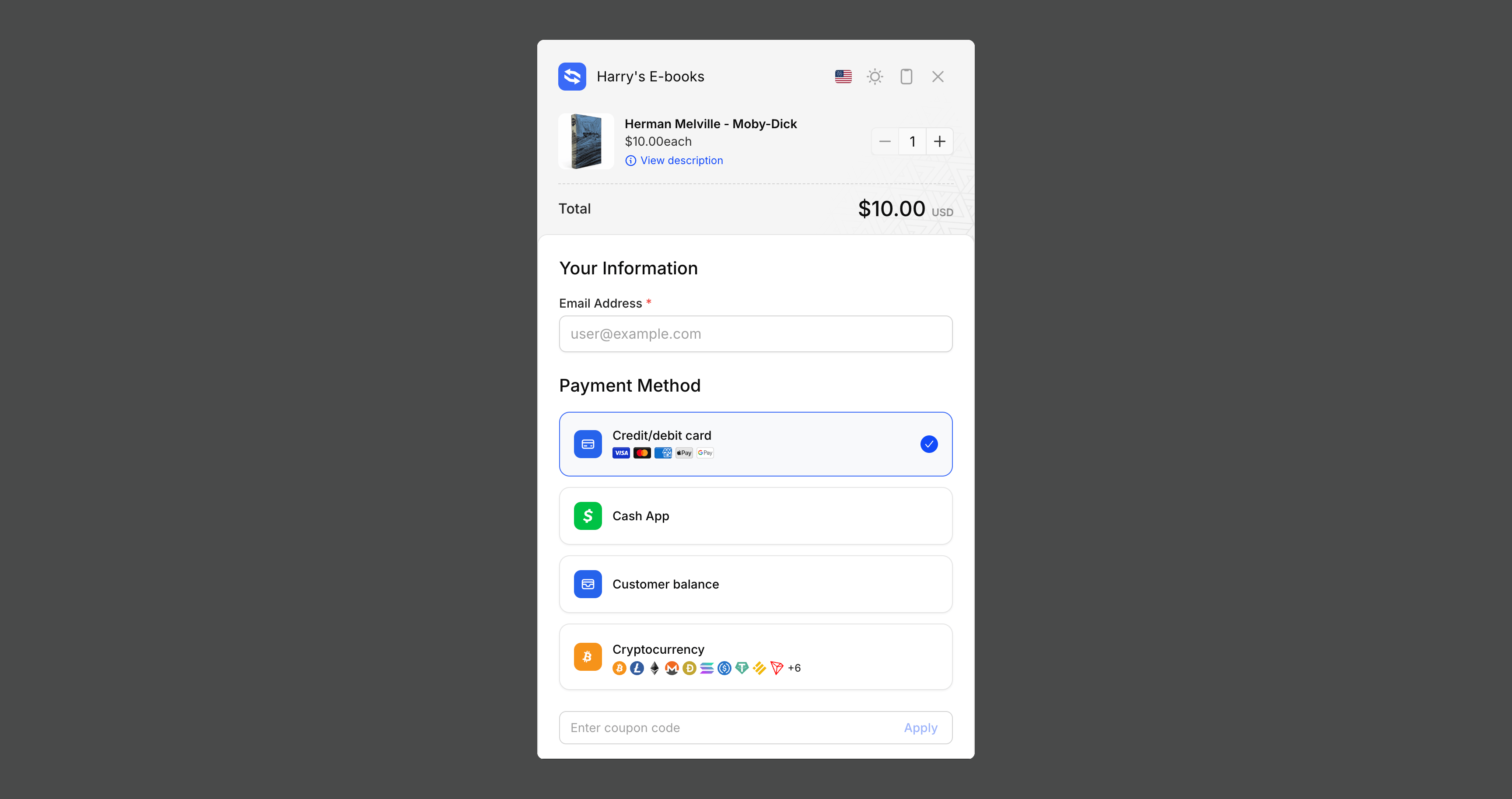
The Komerza Embed SDK allows you to seamlessly integrate our checkout experience directly into your website. Instead of redirecting customers to a separate checkout page, the embed creates a modal overlay that keeps users on your site while providing a secure, optimized payment flow.
See the Embed SDK in action with our interactive demo
Also integrate our analytics script to bring back visitor analytics on your
custom site for complete insights into your customer journey.
## Features
Modal overlay keeps customers on your site during checkout
{" "}
Minimal JavaScript bundle with no external dependencies
{" "}
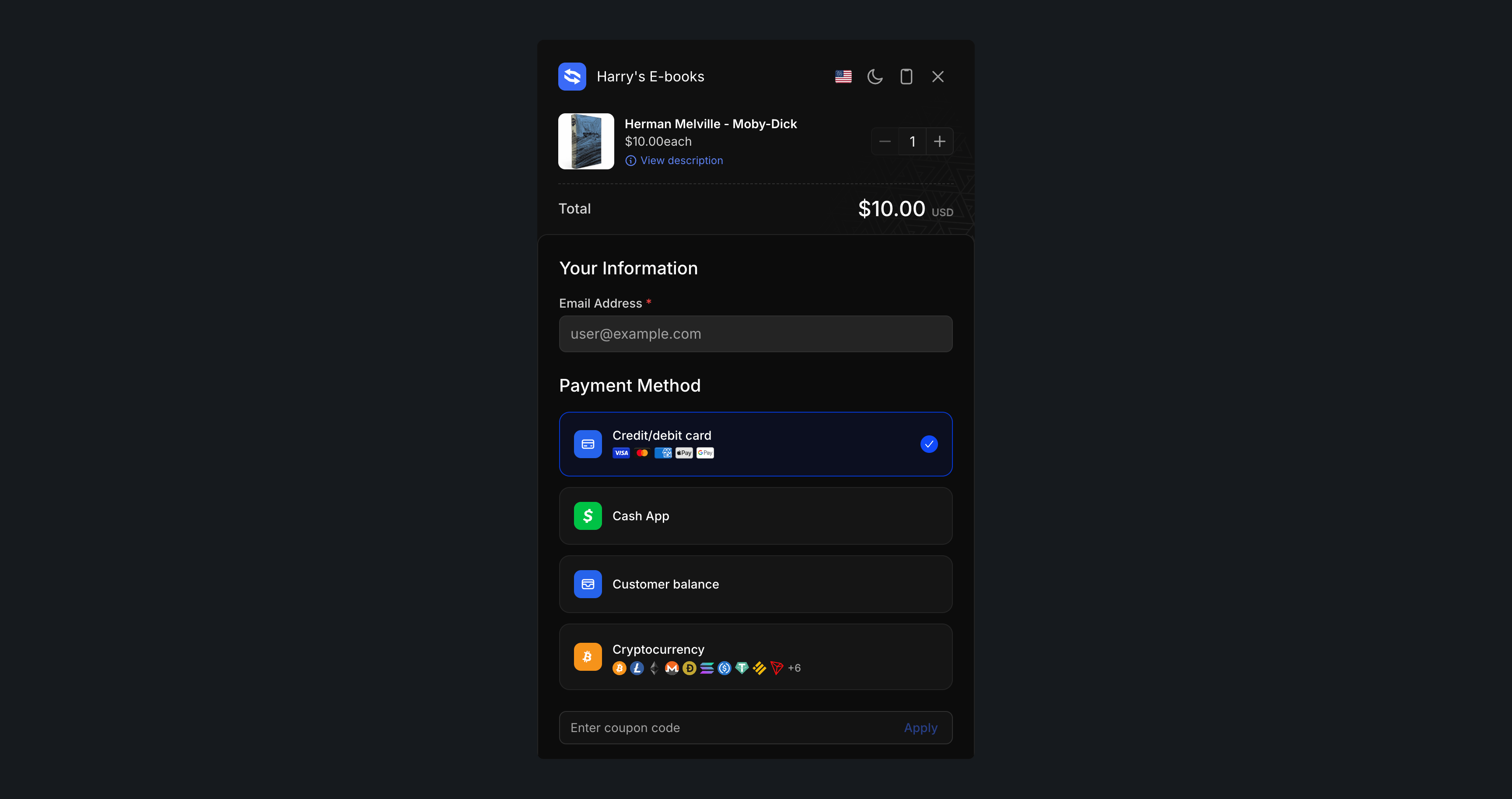
Light, dark, and auto themes to match your site design
Full Content Security Policy support with nonce integration
## Quick Start
Add the following script to your website's `` or before the closing `` tag:
```html theme={null}
```
### Method 1: Data Attributes (Recommended for Simple Use Cases)
The easiest way to add checkout buttons to your site. Just add data attributes to any button or element:
```html theme={null}
```
#### Data Attributes Reference
| Attribute | Required | Description | Example |
| ------------------------ | -------- | --------------------------------------------------------------------------- | --------------------------------------------- |
| `data-kmrza-product-id` | ✅ Yes | The product ID from Komerza | `"0f6294be-25d6-4ced-96df-7d500608c54d"` |
| `data-kmrza-variant-id` | ❌ No | The variant ID from Komerza. Omit it to let the customer choose - see below | `"96f846e5-5f22-46a2-97b3-a1c88f685577"` |
| `data-kmrza-quantity` | ❌ No | Quantity to purchase (default: 1) | `"2"` |
| `data-kmrza-theme` | ❌ No | Theme mode: `light`, `dark`, or `auto` (default: `auto`) | `"dark"` |
| `data-kmrza-return-url` | ❌ No | Custom URL to redirect to after payment | `"https://example.com/thank-you"` |
| `data-kmrza-email` | ❌ No | Prefill the customer's email address | `"customer@example.com"` |
| `data-kmrza-coupon-code` | ❌ No | Prefill and auto-apply a coupon code | `"SAVE20"` |
| `data-kmrza-metadata` | ❌ No | JSON string of custom key-value metadata | `"{"campaign":"summer"}"` |
#### Letting the customer choose a variant
`data-kmrza-variant-id` is optional. If you omit it, checkout opens with a **variant picker** so the customer selects which variant they want before paying:
```html theme={null}
```
This is useful for a single buy button on a product with several editions, tiers or durations, where you would otherwise need one button per variant. Pass `data-kmrza-variant-id` when you want the customer to land on one specific variant with no choice to make.
### Method 2: JavaScript API (For Advanced Use Cases)
For more control, use the JavaScript API to programmatically open the checkout:
```html theme={null}
```
#### Multiple Items
You can add multiple products to the checkout at once:
```javascript theme={null}
Komerza.open({
items: [
{
productId: "0f6294be-25d6-4ced-96df-7d500608c54d",
variantId: "96f846e5-5f22-46a2-97b3-a1c88f685577",
quantity: 2,
},
{
productId: "54d6adb4-c160-4f73-b9c0-6c16970fff41",
variantId: "37e70705-c603-4ab2-8a2e-d16e80288c8c",
quantity: 1,
},
],
theme: "light",
});
```
## Complete Implementation Guide
### HTML Setup
Here's a complete HTML page example:
```html theme={null}
My Store
Amazing Product
Price: $29.99
```
### JavaScript Integration
```javascript theme={null}
// Initialize when page loads
document.addEventListener('DOMContentLoaded', function() {
Komerza.init();
// Bind to your buy button
document.getElementById('buy-now').addEventListener('click', function() {
Komerza.open({
items: [
{
productId: 'prod_123',
variantId: 'var_456',
quantity: 1
}
]
});
});
});
```
```javascript theme={null}
// Advanced integration with error handling and multiple products
class CheckoutManager {
constructor() {
this.isInitialized = false;
this.init();
}
init() {
// Initialize with CSP nonce
Komerza.init({
nonce: this.getCSPNonce()
});
this.isInitialized = true;
this.bindEvents();
}
bindEvents() {
// Bind to all buy buttons
document.querySelectorAll('[data-buy-button]').forEach(button => {
button.addEventListener('click', (e) => {
e.preventDefault();
this.handlePurchase(button);
});
});
// Optional: Bind to close events
document.addEventListener('keydown', (e) => {
if (e.key === 'Escape') {
Komerza.close();
}
});
}
handlePurchase(button) {
const productId = button.dataset.productId;
const variantId = button.dataset.variantId;
const quantity = parseInt(button.dataset.quantity) || 1;
if (!productId || !variantId) {
console.error('Missing product or variant ID');
return;
}
try {
Komerza.open({
items: [{
productId,
variantId,
quantity
}],
theme: this.getTheme()
});
} catch (error) {
console.error('Failed to open checkout:', error);
// Fallback to direct checkout URL
this.fallbackCheckout(productId, variantId, quantity);
}
}
getTheme() {
// Auto-detect theme based on user preference or site theme
if (window.matchMedia && window.matchMedia('(prefers-color-scheme: dark)').matches) {
return 'dark';
}
return 'light';
}
getCSPNonce() {
// Extract nonce from script tag or meta tag
const script = document.querySelector('script[nonce]');
return script ? script.getAttribute('nonce') : null;
}
fallbackCheckout(productId, variantId, quantity) {
// Fallback to direct checkout page if embed fails
const checkoutUrl = `https://checkout.komerza.com/product/${productId}/${variantId}?qty=${quantity}`;
window.location.href = checkoutUrl;
}
}
// Initialize when DOM is ready
document.addEventListener('DOMContentLoaded', function() {
new CheckoutManager();
});
```
```jsx theme={null}
import React, { useEffect, useState } from 'react';
// Declare the global Komerza object
declare global {
interface Window {
Komerza: {
init: (options?: { nonce?: string }) => void;
open: (options: EmbedOptions) => void;
close: () => void;
};
}
}
interface EmbedOptions {
items: Array<{
productId: string;
variantId: string;
quantity?: number;
}>;
theme?: 'light' | 'dark' | 'auto';
}
const ProductPage: React.FC = () => {
const [isEmbedReady, setIsEmbedReady] = useState(false);
useEffect(() => {
// Load the embed script
const script = document.createElement('script');
script.src = 'https://checkout.komerza.com/embed/embed.iife.js';
script.onload = () => {
window.Komerza.init();
setIsEmbedReady(true);
};
document.head.appendChild(script);
return () => {
// Cleanup script on unmount
document.head.removeChild(script);
};
}, []);
const handleBuyClick = () => {
if (!isEmbedReady) {
console.warn('Embed SDK not ready yet');
return;
}
window.Komerza.open({
items: [
{
productId: 'prod_123',
variantId: 'var_456',
quantity: 1
}
],
theme: 'auto'
});
};
return (
Amazing Product
Price: $29.99
);
};
export default ProductPage;
```
## API Reference
### `Komerza.init(options?)`
Initializes the embed and automatically binds all elements with `data-kmrza-*` attributes.
```javascript theme={null}
Komerza.init({
nonce: "YOUR_CSP_NONCE", // Optional: for Content Security Policy
});
```
**Options:**
* `nonce` (optional): CSP nonce for injected styles and scripts
**Note:** This is called automatically when using the JS API (`Komerza.open()`), but should be called explicitly if you're using data attributes.
### `Komerza.open(options)`
Opens the checkout modal programmatically.
```javascript theme={null}
Komerza.open({
items: [
{
productId: string, // Required
variantId?: string, // Optional, omit to show a variant picker
quantity?: number // Optional, default: 1
}
],
theme?: 'light' | 'dark' | 'auto', // Optional, default: 'auto'
affiliateCode?: string, // Optional, override affiliate tracking code
returnUrl?: string, // Optional, custom return URL after payment
email?: string, // Optional, prefill customer email
couponCode?: string, // Optional, prefill and apply coupon code
metadata?: Record // Optional, custom order metadata
});
```
**Parameters:**
* `items` (required): Array of products to add to checkout
* `productId` (required): Product identifier
* `variantId` (optional): Product variant identifier. Omit it and checkout shows a variant picker so the customer chooses
* `quantity` (optional): Number of items (default: 1)
* `theme` (optional): Color theme for the checkout modal
* `'auto'` - Matches user's system preference (default)
* `'light'` - Light mode
* `'dark'` - Dark mode
* `affiliateCode` (optional): Override affiliate tracking code, this will override any other affiliate tracking code whether that be from cookies or the URL.
* `returnUrl` (optional): Custom URL to redirect customers to after payment completion instead of the default store URL.
* `email` (optional): Prefill the customer's email address in the checkout form.
* `couponCode` (optional): Prefill and automatically apply a coupon code at checkout.
* `metadata` (optional): Attach custom key-value metadata to orders for tracking purposes (e.g., campaign tracking, user IDs, referral sources).
### `Komerza.close()`
Closes the checkout modal programmatically.
```javascript theme={null}
Komerza.close();
```
### Basic Button
```html theme={null}
```
### Dark Theme with Custom Quantity
```html theme={null}
```
### Full Options Example (Data Attributes)
```html theme={null}
```
### Full Options Example (JavaScript API)
```javascript theme={null}
Komerza.open({
items: [{ productId: "...", variantId: "...", quantity: 2 }],
theme: "dark",
affiliateCode: "partner123",
returnUrl: "https://example.com/thank-you",
email: "vip@example.com",
couponCode: "VIP25",
metadata: {
campaign: "vip-promotion",
source: "landing-page",
},
});
```
### Dynamic Cart with JavaScript
```html theme={null}
```
### React Integration
```jsx theme={null}
import { useEffect } from "react";
function CheckoutButton({ productId, variantId, quantity = 1 }) {
useEffect(() => {
// Load the script
const script = document.createElement("script");
script.src = "https://checkout.komerza.com/embed/embed.iife.js";
script.defer = true;
document.body.appendChild(script);
return () => {
document.body.removeChild(script);
};
}, []);
const handleClick = () => {
if (window.Komerza) {
window.Komerza.open({
items: [{ productId, variantId, quantity }],
theme: "auto",
});
}
};
return ;
}
```
### Next.js Integration
```jsx theme={null}
// components/CheckoutButton.jsx
"use client";
import { useEffect } from "react";
import Script from "next/script";
export default function CheckoutButton({ productId, variantId, quantity = 1 }) {
const handleClick = () => {
if (window.Komerza) {
window.Komerza.open({
items: [{ productId, variantId, quantity }],
});
}
};
return (
<>
);
}
```
## TypeScript Support
Type definitions are included. You can use them like this:
```typescript theme={null}
import type {
EmbedOptions,
InitOptions,
} from "https://checkout.komerza.com/embed/embed.iife.js";
interface EmbedOptions {
items: EmbedItem[];
theme?: "light" | "dark" | "auto";
affiliateCode?: string;
returnUrl?: string;
email?: string;
couponCode?: string;
metadata?: Record;
}
const options: EmbedOptions = {
items: [
{
productId: "abc123",
variantId: "xyz789",
quantity: 1,
},
],
theme: "auto",
returnUrl: "https://example.com/thank-you",
email: "customer@example.com",
couponCode: "SAVE20",
metadata: {
campaign: "summer-sale",
source: "landing-page",
},
};
window.Komerza.open(options);
```
## Troubleshooting
Full troubleshooting guide: console errors, CSP, ad blockers, framework
gotchas, and what to send support.
### The checkout doesn't open
1. Make sure the script is loaded (`defer` attribute is recommended)
2. Check browser console for errors
3. Verify your product and variant IDs are correct
4. If using data attributes, ensure `Komerza.init()` is called after DOM is loaded
### Modal appears behind other elements
The modal uses a high z-index (9999). If it's still behind elements, check your CSS for competing z-index values.
### Theme doesn't apply
The `theme` parameter accepts only `'light'`, `'dark'`, or `'auto'`. Check for typos.
## Affiliates
The Komerza Embed SDK supports affiliate tracking out of the box:
* By default, the embed will automatically support deep linking using the `?ref` query parameter on any URL where it runs. For example, a visitor arriving at `https://example.com/?ref=aff_12345` will have `aff_12345` attributed as the affiliate code.
* The SDK will also read the `kmrza_affiliate` cookie (if present) and pass that affiliate code to the order automatically, unless you override it.
* You can override the automatic behavior by passing an explicit `affiliateCode` to `Komerza.open()`.
No manual setup is required for affiliate tracking - just use the standard initialization and checkout flow.
***
## Content Security Policy (CSP)
For enhanced security, configure your CSP headers to allow the Komerza embed:
```http theme={null}
Content-Security-Policy:
frame-src https://checkout.komerza.com;
script-src 'self' 'nonce-YOUR_NONCE' https://checkout.komerza.com;
style-src 'self' 'nonce-YOUR_NONCE';
```
Then pass the nonce to the SDK:
```javascript theme={null}
Komerza.init({
nonce: "YOUR_NONCE",
});
```
## Best Practices
* Load the SDK script asynchronously when possible
* Initialize the SDK early but only open modals on user interaction
* Implement proper loading states for buy buttons
{" "}
* Provide clear loading indicators - Handle network failures gracefully with
fallback URLs - Support keyboard navigation (ESC to close)
* Always use CSP headers in production
* Validate product IDs and variant IDs before opening checkout
* Never expose sensitive data in client-side code
## Analytics Integration
Also integrate our analytics script to bring back visitor analytics on your
custom site
Track the complete customer journey by combining the Embed SDK with our analytics script. This gives you insights into visitor behavior, conversion rates, and checkout abandonment on your custom site.
## Support
Need help with integration?
Interactive demo with source code examples
Get technical support for integration issues
 ## Overview
The Komerza Embed SDK allows you to seamlessly integrate our checkout experience directly into your website. Instead of redirecting customers to a separate checkout page, the embed creates a modal overlay that keeps users on your site while providing a secure, optimized payment flow.
## Overview
The Komerza Embed SDK allows you to seamlessly integrate our checkout experience directly into your website. Instead of redirecting customers to a separate checkout page, the embed creates a modal overlay that keeps users on your site while providing a secure, optimized payment flow.